AI Privacy & Security: What Small Businesses Need to Know
Your employees are almost certainly using AI tools at work. According to recent industry data, most are doing so without IT approval, oversight, or any understanding of what happens to the data they type, paste, or upload. For small businesses, this isn't a theoretical risk — it's happening right now.
This guide is a practical walkthrough of how the major AI tools handle your data, what can go wrong, and what you can actually do about it — whether you're a business owner, a team lead, or the person everyone asks "is this safe to use?"
What Happens When You Hit "Send"
Every message you type into an AI tool passes through a multi-stage pipeline. Understanding each step is the foundation for making informed decisions about what you share.
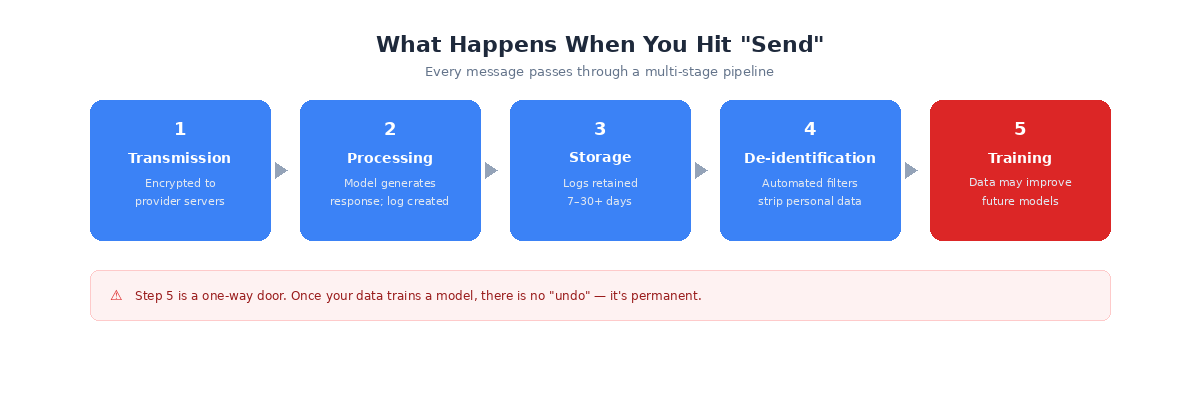
- Transmission — Your message is encrypted and sent to the provider's servers.
- Processing — The model generates a response and a log is created.
- Storage — Logs are retained for 7 to 30+ days, depending on the provider.
- De-identification — Automated filters attempt to strip personal data.
- Training — Processed data may be used to improve future models.
The critical insight here is that step 5 is a one-way door. Once your data trains a model, there is no "undo." You cannot extract it back out — not through a deletion request, not through account closure, not through anything. It is permanent.
The Most Important Distinction You're Probably Missing
Most people collapse three very different concepts into one word — "privacy." But storage, human review, and training are fundamentally different, and understanding the difference changes how you think about AI tools.
Storage means the company keeps a copy of your conversation on their servers. This happens almost universally, even with privacy settings enabled. Minimum retention ranges from 7 to 30 days across providers.
Human review means a real person at the company could read your conversation. All four major providers reserve this right. Google retains human-reviewed data for up to 3 years — even after you delete the conversation from your account.
Training means your conversation becomes data that makes the next model smarter. Consumer tiers generally have training ON by default. Enterprise tiers always have it OFF by contract.
Here's the part that trips people up: turning off training does NOT mean your data isn't stored. It does NOT mean no human will ever read it. These are three separate controls.
A Toggle Is Not a Contract
When you flip a switch in your AI tool's privacy settings, you're trusting a setting — not a legal document. That toggle can be changed by the company in a future policy update with no legal obligation to maintain it and no legal remedy if they violate it.
Enterprise tiers are different. They come with legally binding agreements backed by contractual penalties. A Data Processing Addendum (DPA) spells out exactly how your data is handled, stored, and protected. It cannot be changed without both parties agreeing.
You're not just paying for better features when you upgrade to enterprise — you're paying for legal protection over your data.
The Big Four: How They Actually Compare
ChatGPT, Gemini, Claude, and Perplexity dominate business AI usage, but their privacy defaults differ dramatically.
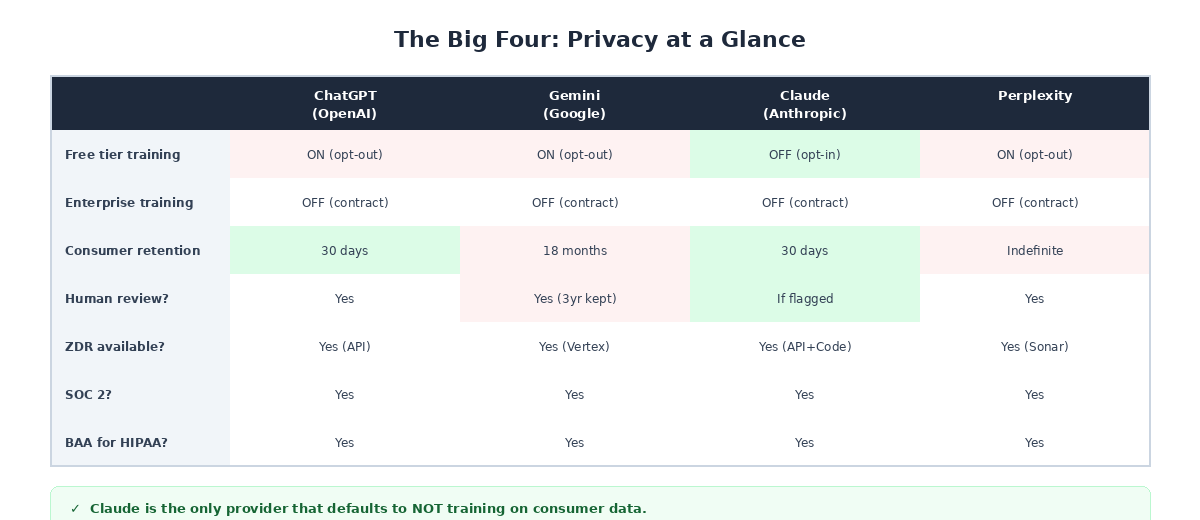
ChatGPT (OpenAI) is the most widely used. Training is ON by default for free and paid consumer tiers ($20/mo Plus). Only the $200/mo Pro tier has training off by default. Enterprise tiers (~$60/seat/mo) offer full contractual protections, SOC 2, BAA for HIPAA, and data residency in 10 global regions. Worth noting: an active lawsuit requires OpenAI to preserve conversation data for non-enterprise tiers beyond their stated 30-day policy.
Gemini (Google) has the longest default data retention at 18 months — the longest of any major provider by far. Human-reviewed data is retained for 3 years in a separate system, even after you delete the conversation from your account. The free tier cannot opt out of training while keeping chat history — they're tied together. Google's upcoming "Personal Intelligence" feature connects Gemini to Gmail, Photos, and Calendar, enabled by default in the US.
Claude (Anthropic) is the only provider that defaults to NOT training on consumer data — even on the free tier. The "Help improve Claude" toggle is OFF by default, and users must actively opt in. API data retention is just 7 days, the shortest of all four. Anthropic also holds ISO 42001 certification, a new AI-specific security standard. One caveat: their Zero Data Retention (ZDR) covers API and Claude Code only — not the web interface.
Perplexity routes queries through multiple third-party models (OpenAI, Anthropic), but maintains contractual zero-training agreements with those providers. Consumer conversations are stored indefinitely until manually deleted — the longest consumer retention of all four. Perplexity also shares more data with advertisers and business partners than the other three, and faces a class-action lawsuit alleging embedded tracking code.
Don't Forget About Files and Voice
Uploaded files follow the same privacy and training policies as text chat. If training is on, your files are included. But there's a catch that most people miss: no provider strips file metadata by default.
Photos carry EXIF data with GPS coordinates and timestamps. Word documents include author names and tracked changes. PDFs embed creation dates and comments. Before uploading anything sensitive, use "Inspect Document" in Word or strip metadata from images using a tool like ExifTool.
For voice mode, policies vary. OpenAI is actually more restrictive — audio isn't trained on even when the text training toggle is enabled. Google Gemini treats voice the same as text, meaning it can be reviewed by humans and retained for 3 years. Across all providers, voice recordings are stored for at least 30 days for abuse monitoring.
Shadow AI: The Risk You Can't See
"Shadow AI" is the term for employees using unapproved AI tools at work — and it's far more widespread than most business owners realize. Industry data shows a significant increase in shadow AI usage from 2023 to 2025, with most enterprises having zero visibility into what tools employees are actually using.
Employees paste customer data, source code, financial projections, and legal documents into free-tier AI tools daily. The cost isn't limited to potential breach costs — it includes direct costs and hidden productivity losses.
Blocking tools isn't the answer either. If employees don't have good approved options, they'll find unapproved ones. The solution requires providing approved tools, implementing data loss prevention controls, creating clear policies, and genuine training.
When It Goes Wrong: Real-World Incidents
These aren't hypothetical scenarios — they've already happened.
In March 2023, Samsung engineers pasted proprietary semiconductor source code and internal meeting notes into ChatGPT for debugging help. That data entered OpenAI's training pipeline — permanently and irretrievably. Samsung immediately banned all employee AI use, but the damage was already done.
In 2024, a vulnerability in the Flowise AI platform (CVE-2024-31621) exposed 438 servers, leaking GitHub tokens, OpenAI API keys, and model configurations — all in plaintext.
In August 2025, a threat actor used stolen OAuth tokens from an AI-powered customer service integration to access over 700 organizations' Salesforce environments.
Throughout 2024 and 2025, multiple AI app breaches exposed millions of patient records, intimate messages, government ID documents, and children's conversations across various platforms. More than 20 documented AI app data breaches occurred in the first months of 2025 alone.
The Regulatory Clock Is Ticking
If the security risks aren't enough motivation, the regulatory landscape is tightening fast.
Over 20 US states now have comprehensive privacy laws. HIPAA requires Business Associate Agreements (BAAs) for any AI processing health data. FINRA requires AI governance for financial services. And the EU AI Act becomes fully enforceable on August 2, 2026 — roughly four months away — with penalties of up to 7% of global annual turnover, higher than GDPR. It applies to any organization whose AI is used in or affects the EU, regardless of company location.
There's also the US CLOUD Act, which means US law enforcement can compel any US-headquartered company to provide data stored anywhere in the world. All four major AI providers are US-based. Data residency does not equal data sovereignty.
If you don't have an AI governance framework in place, enforcement is coming faster than most organizations realize.
What You Can Do Right Now
Individual Users — Do Today
- Turn off training in every AI tool you use (Settings → Privacy/Data Controls)
- Use temporary or incognito chat modes for sensitive queries
- Never paste passwords, API keys, credentials, or financial account numbers
- Strip metadata from files before uploading
- Treat AI like a public conversation — don't type anything you wouldn't say on a conference call with strangers
This Week
- Review which AI tools you've signed up for and what data they hold
- Delete old conversations you no longer need
- Switch to your organization's approved enterprise AI tools instead of personal free accounts
- Review privacy settings after every major product update — providers change defaults frequently
For IT & Security Teams
- Provide approved tools — Deploy enterprise tiers with contractual protections. Budget reference: ChatGPT Enterprise ~$60/seat/mo, Claude Enterprise ~$60/seat/mo, Gemini Enterprise $30/seat/mo, Perplexity Enterprise Pro $40/seat/mo.
- Implement technical controls — Deploy DLP at the prompt level (tools like Nightfall AI, Microsoft Purview, or Cloudflare AI Gateway), and use a CASB to detect unauthorized AI tool access.
- Create and enforce policy — Publish an AI Acceptable Use Policy, include a data classification framework, and mandate real training with verification.
- Monitor and audit — Detect shadow AI usage, audit approved tool usage patterns, and review provider privacy policies quarterly.
A Simple Framework: What Data Can Go Where?
Not all data is equal. If your organization does nothing else, implement this classification framework.
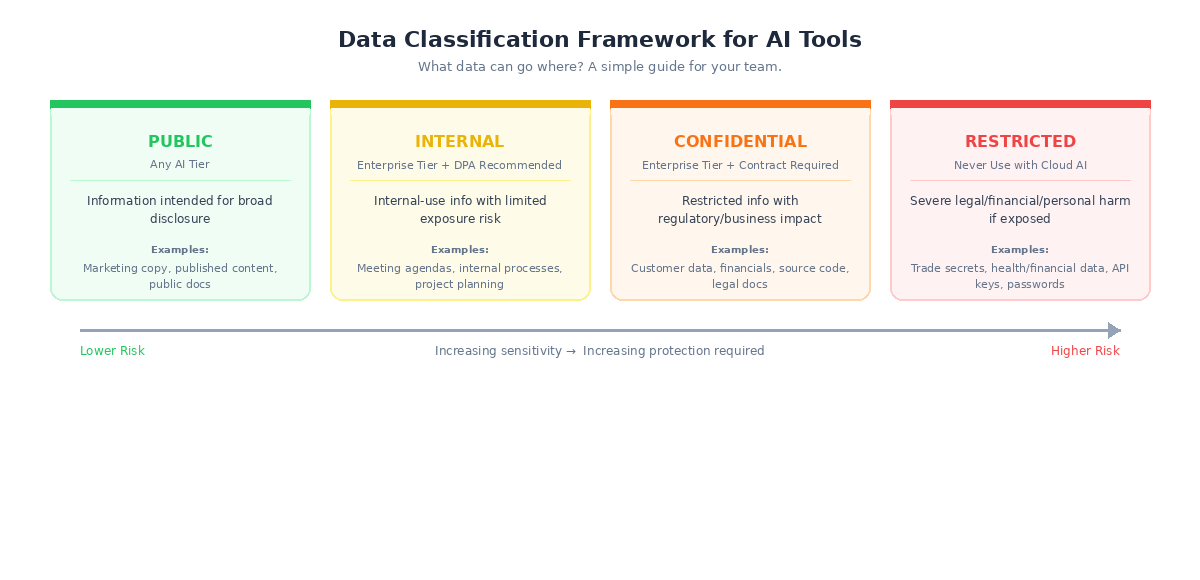
Public (any AI tier) — Information intended for broad disclosure: published content, marketing materials, public documentation. Example: "Summarize this blog post" or "Help me write a social media caption."
Internal (enterprise tier with DPA recommended) — Internal-use information with limited exposure risk: internal processes, general business discussions, non-sensitive project planning. Example: "Help me structure this team meeting agenda."
Confidential (enterprise tier with contractual protections required) — Restricted access information with regulatory or business impact if exposed: customer data, financial projections, source code, legal documents, HR records.
Restricted (never use with cloud AI) — Highest sensitivity: trade secrets, regulated health or financial data, classified information, credentials and API keys. Use on-premises solutions or don't use AI at all.
The 7-Question Privacy Test for Any AI Tool
When evaluating any AI tool — not just the big four — walk through these seven questions:
- Does this tool train on my data by default? Best: opt-in (training OFF by default). Red flag: no opt-out or vague language.
- Where is my data stored, and for how long? Best: short retention (7–30 days) with geographic region specified. Red flag: "indefinite" or unspecified retention.
- Can humans at the company read my conversations? Best: only for flagged content with documented access controls. Red flag: broad human review with no specifics.
- Is there a Data Processing Addendum (DPA) available? If there's no DPA, the tool is not ready for organizational data — full stop.
- What compliance certifications does this tool hold? Baseline: SOC 2 Type II. Better: ISO 27001. Healthcare: BAA required.
- What happens to my files and metadata? Best: files processed in memory, metadata stripped, not retained. Red flag: no file-specific privacy policy.
- What happens to my data if the company is acquired or goes bankrupt? Best: explicit data deletion clause. Red flag: silence on this topic — data may become a transferable asset.
Frequently Asked Questions
Is it safe to use free AI tools for work? It depends on what you're putting in. For truly public information — drafting marketing copy, brainstorming ideas, or summarizing published articles — free tiers are generally fine. But for anything involving customer data, financial information, internal processes, or proprietary knowledge, free tiers are risky. Three of the four major providers train on your data by default on free tiers, and you have zero contractual protection.
We're a small team — do we really need enterprise tiers? If you're handling any customer data, financial information, health records, or proprietary business information, yes. Enterprise tiers aren't just about features — they're about legal protection. That said, many providers offer "Team" tiers at lower price points that include the most critical protections (no training, DPAs). Start there if full enterprise pricing doesn't fit your budget.
Can I just tell my team not to use AI? You can try, but history suggests it won't work. Employees will use AI tools regardless — they'll just do it without your knowledge (shadow AI). A better approach is to provide approved tools with clear guidelines about what data can and can't go in. Give your team good options and they're far less likely to reach for unapproved ones.
What if we've already put sensitive data into a free AI tool? Turn off training immediately in your settings, delete the conversations, and switch to an enterprise tier going forward. Unfortunately, if training was enabled when the data was submitted, there's no way to extract it from the model. The best you can do is prevent further exposure and assess what was shared to determine if notification obligations apply.
How often do AI providers change their privacy policies? Frequently. Major providers update their terms several times per year, and these updates can change defaults, retention periods, and training practices. Make it a habit to review privacy settings quarterly, and consider subscribing to provider privacy update notifications. This is one reason why contractual protections (enterprise tiers) matter — a contract can't change without your agreement, but a privacy policy can.
Do AI tools comply with HIPAA? Not automatically. All four major providers offer HIPAA-compliant options, but only on enterprise tiers with a signed Business Associate Agreement (BAA). Using any AI tool with patient health information without a BAA in place is a HIPAA violation, regardless of how the provider markets their security features.
What about AI tools that connect to our email, calendar, or files? Every integration expands the data flowing through the AI provider. Google's "Personal Intelligence" feature, for example, connects Gemini to Gmail, Photos, and Calendar — enabled by default in the US. Before enabling any integration, ask: does this tool actually need access to this data? Each new connection increases your attack surface.
Is anonymization enough to protect our data? No. While all four providers claim to de-identify data before training, no provider publishes their specific methods or accuracy rates. Google's own documentation acknowledges anonymization is "probabilistic" — a best effort, not a guarantee. Academic research has demonstrated extraction of personal information from supposedly anonymized training data. Anonymization reduces risk, but it doesn't eliminate it.
Final Thoughts
AI is powerful, and it's not going away. The goal isn't to avoid it — it's to use it with your eyes open.
The good news is that the steps to protect your business aren't complicated. Turn off training on consumer tools. Use enterprise tiers for anything sensitive. Create a simple data classification policy so your team knows what goes where. And treat AI the same way you'd treat any other vendor that handles your data — with clear agreements, ongoing oversight, and a healthy respect for what's at stake.
If you're not sure where to start, or you want help evaluating tools and building an AI governance framework for your team, book a free 30-minute consultation and we'll figure it out together.