Practical AI Notetaker Automations You Can Build Today
A few years ago, taking good meeting notes was a skill, and a pain in the butt. We actually had dedicated note takers for executive meetings, a person whose only job was to sit there, listen and jot down our profound and world-changing ideas.
That's gone now. AI transcription is one of those quiet productivity revolutions that snuck up on us. The tools are everywhere, they all work, and most of them are free or close to it. The interesting question isn't which one to use anymore. It's what to do with the output.
This post is about that second half — the "what now" — because that's where almost all the value sits, and where most teams are leaving the most on the table.
The Landscape
You've probably heard of most of these — Otter, Fireflies, Granola, and Gemini Notetaker (the one I personally use, since most of my clients live in Google Workspace). Every one of them produces some version of the same three artifacts — a full transcript, a structured summary, and a list of action items (by person). The differences are mostly cosmetic — where the digest lands, how clean the formatting is, whether it integrates with your CRM or Slack or whatever else.
AI notetakers are useful as stand-alone tools — I reference them constantly before follow-up meetings to make sure I didn't miss anything. But oftentimes these summaries end up just sitting in your inbox, doing nothing, acting as a reference file, and, on occasion, a useful accusatory "I told you so." Like those Progressive What Really Happened Replay commercials — it's getting harder and harder to go back on what was said.
Making It Useful
So we all have note-taking apps. The real question: how do we make that information useful? How do we make sure follow-ups get followed up on, unknowns get researched, future meetings get scheduled, and in general, the ball doesn't get dropped.
Today I'm going to walk through a few simple automations that can help with this problem.
- Post-meeting time blocker (with estimates and calendar events)
- Post-meeting to-do list updates
- Post-meeting follow-up appointment
- Post-meeting CRM updates (for new clients or intro meetings)
How it works at a high-level
The concept is the same for all of these, and can work across all note takers. Note Taker Sends a Summary → Extract Relevant Data → Perform Follow-up Tasks.
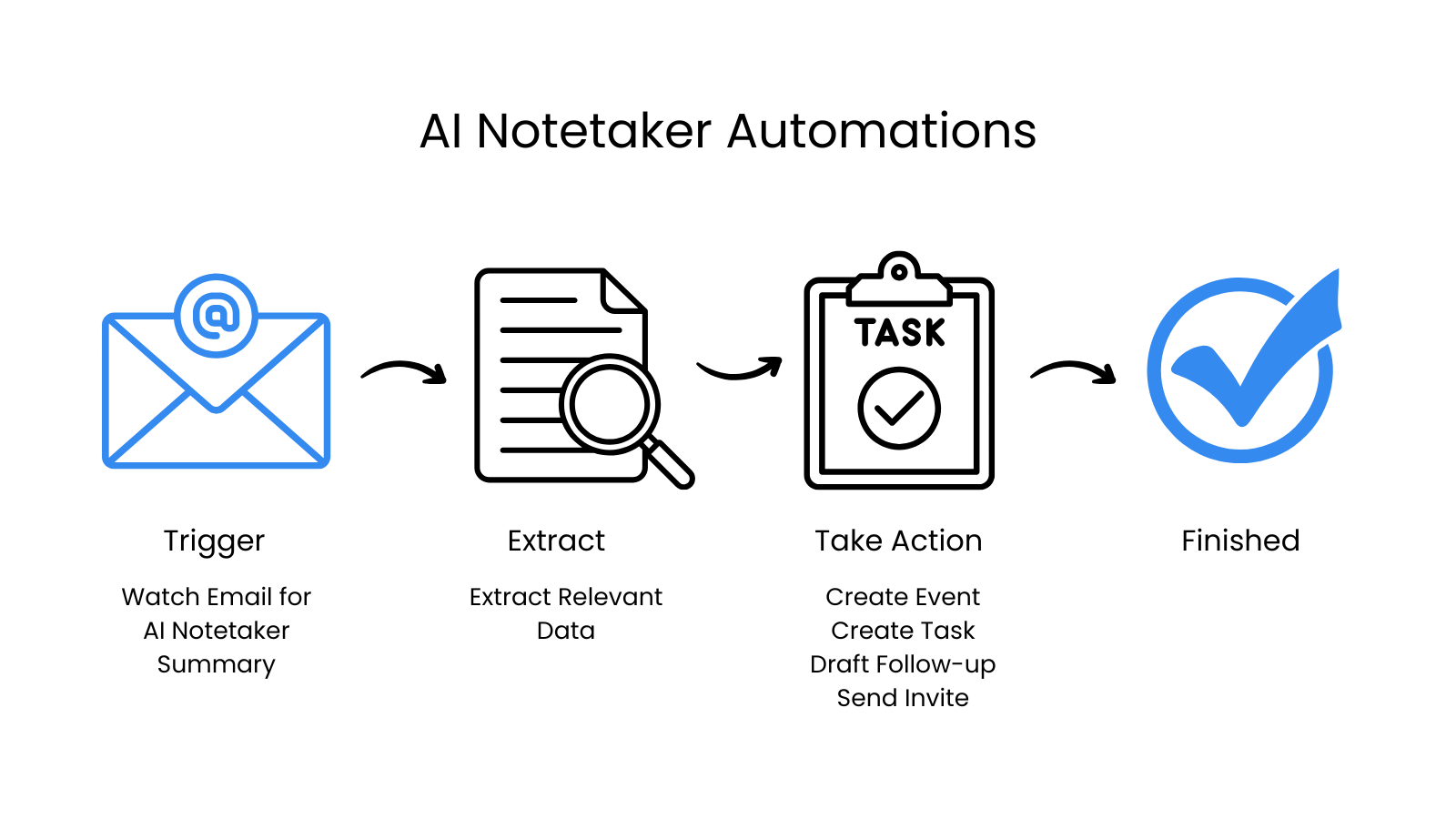
Once a meeting note is structured text in your inbox, an automation can read it and do almost anything you'd do with it. The final automation — the agent at the end of this post — is what I'm actually running for Lumio.
Example 1: Action items → calendar blocks
I use Google Calendar as a time tracker — it lets me block time for deep work or tasks that require focus. So the first thing I automated was a calendar time blocker.
It's pretty simple. A Make.com scenario watches Gmail for incoming Gemini notes. It extracts the items assigned to me, estimates the time for each, checks my calendar over the next five days, and creates time blocks in the open slots.

I also covered this one in Five Practical Email Automations (Workflow #3).
That alone saves me ~15 minutes per meeting in the "okay, when am I actually doing this?" tax. But it's only one of four things the meeting note can drive.
Example 2: Post-Meeting → Task Updates
Or — in addition to the calendar block — you could push action items to your to-do list automatically. This can be any tool you prefer — Todoist, Things, Notion, Linear. They all have APIs that work the same way. Each task gets:
- A short title
- A link back to the original meeting note
- The relevant snippet of context
- A suggested due date based on the meeting's content (e.g., "before our next call")
Here are a few items pulled from a recent client meeting:
Look into Obsidian to figure out if it has an API key where some things could be automated.
Send Grace the Gemini meeting notes after this meeting.
Send Catherine a couple of links and look through the notes to brainstorm automation ideas.
These are real items from my last few weeks. They're 5–15 minute tasks. Booking a calendar block for them feels heavy. But losing them to inbox archaeology is exactly how things slip.
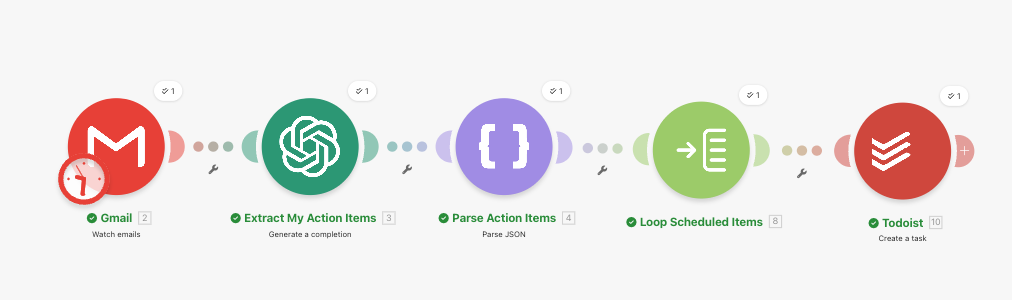
There's room for consolidation here. You could merge them into one automation that estimates the time for each task — anything under 30 minutes goes to your to-do list, anything over 30 minutes gets a calendar block for focused work.
This one's more complex — but you can see how these things compound.
Now the small stuff has somewhere to live. It's not blocking calendar time, but it's also not getting forgotten. The task manager and the calendar are doing what each is good at, and the meeting note is silently feeding both.
Example 3: Post-Meeting → Follow-up Meeting Invite
Most meetings come with follow-ups and next steps, and often that involves scheduling the next meeting. Ideally (at least in the sales world), you'd schedule that meeting on the call. But sometimes you come out of a meeting with a simple task: "send meeting invite for May 19th at 2pm." This can be automated, too.
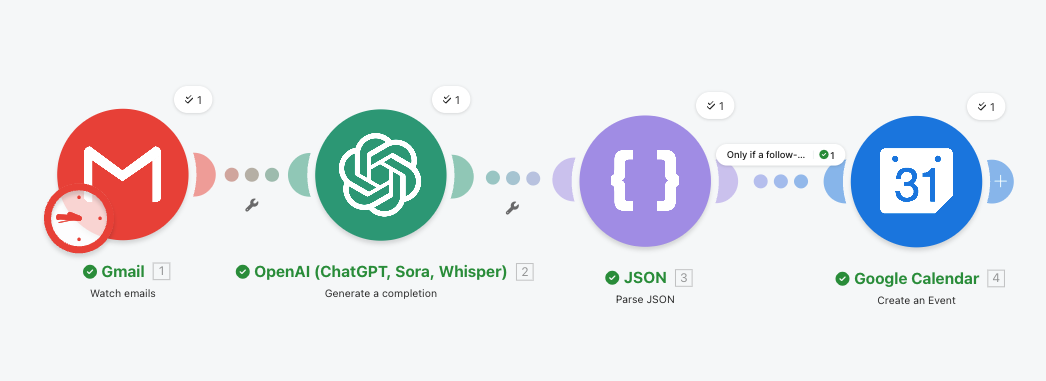
This one is a bit trickier, since there's no "draft calendar invite" concept like there is for email. So if you want to confirm the details before actually sending invites, you would create the invite for yourself but suppress the actual invites with sendUpdates=none.
If you do this, there's a risk that you see the event and forget that invites were never sent, so I'd pair the event creation with a to-do list task — covering you from both sides.
Example 4: Contact info → CRM
Those first three are all about action items. The next one is about people.
Many of my client meetings are first-time conversations — free consultations with owners or operators who want to talk through AI for their team. The meeting summary contains everything I'd want in a CRM record: the person's name, their company, what they do, what they're trying to solve, who else was on the call.
Here's a real example from a meeting I had recently with a potential client. The Gemini notes captured all of this:
A nonprofit focused on environmental facilitation identified themselves as AI novices and expressed interest in process improvements and basic training for their 10 staff members. The organization uses Gemini due to its Google Drive integration but seeks to understand the trade-offs with other platforms like Claude and ChatGPT.
The organization's primary need is AI integration for tasks such as creating diverse training and public meeting materials, translating technical information, and developing extensive project proposals.
Thomas Bouwman proposed a 2-hour introductory training to cover basic AI capabilities and essential best practices.
There is enough information in those three paragraphs to build a complete CRM record. Name. Email (already in the meeting metadata). Company. Industry. Team size. Stage of AI adoption. Specific use cases. Pricing discussed. Stage in my pipeline.
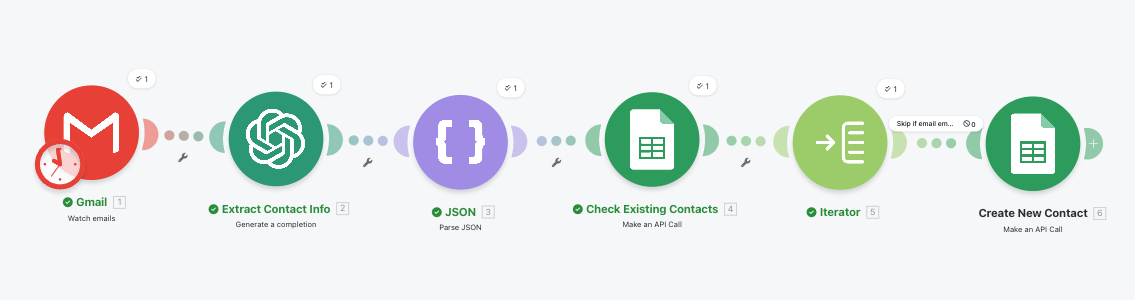
The automation works like this: a meeting note arrives. AI extracts the attendee details and meeting context. The workflow checks my CRM for that contact. If they're new, it creates the record with all of the above pre-filled into the right fields. If they exist, it adds the meeting summary as a new activity on their record and updates anything that's changed.
As a solo consultant, I don't use a fancy CRM — I track everything in Google Sheets. The concept is the same: extract attendee details, check if new, create a row, or update "last contacted" if they're already there.
A simple automation that saves maybe 5–10 minutes of CRM hygiene, but it adds up over time.
The bigger idea: a proactive follow-up assistant
By this point, you might be thinking… but wait, I want to do all of these things — and that's exactly where this is going.
A more elegant version is a single agent that watches your inbox, reads each new meeting note, and routes the contents to wherever they need to go. One brain, many destinations. For each action item it sees, it decides:
- Is this for me, or someone else? (If not me, ignore.)
- Is it a small task? (Reminders / Todoist.)
- Does it need a focused block of time? (Calendar.)
- Does it imply a CRM update? (Update the contact record.)
- Does it imply a follow-up email? (Draft it.)
- Does it imply scheduling something? (Pull up my availability and draft an invite.)
- Is it research the agent could just do? (Do it. Email me your findings.)
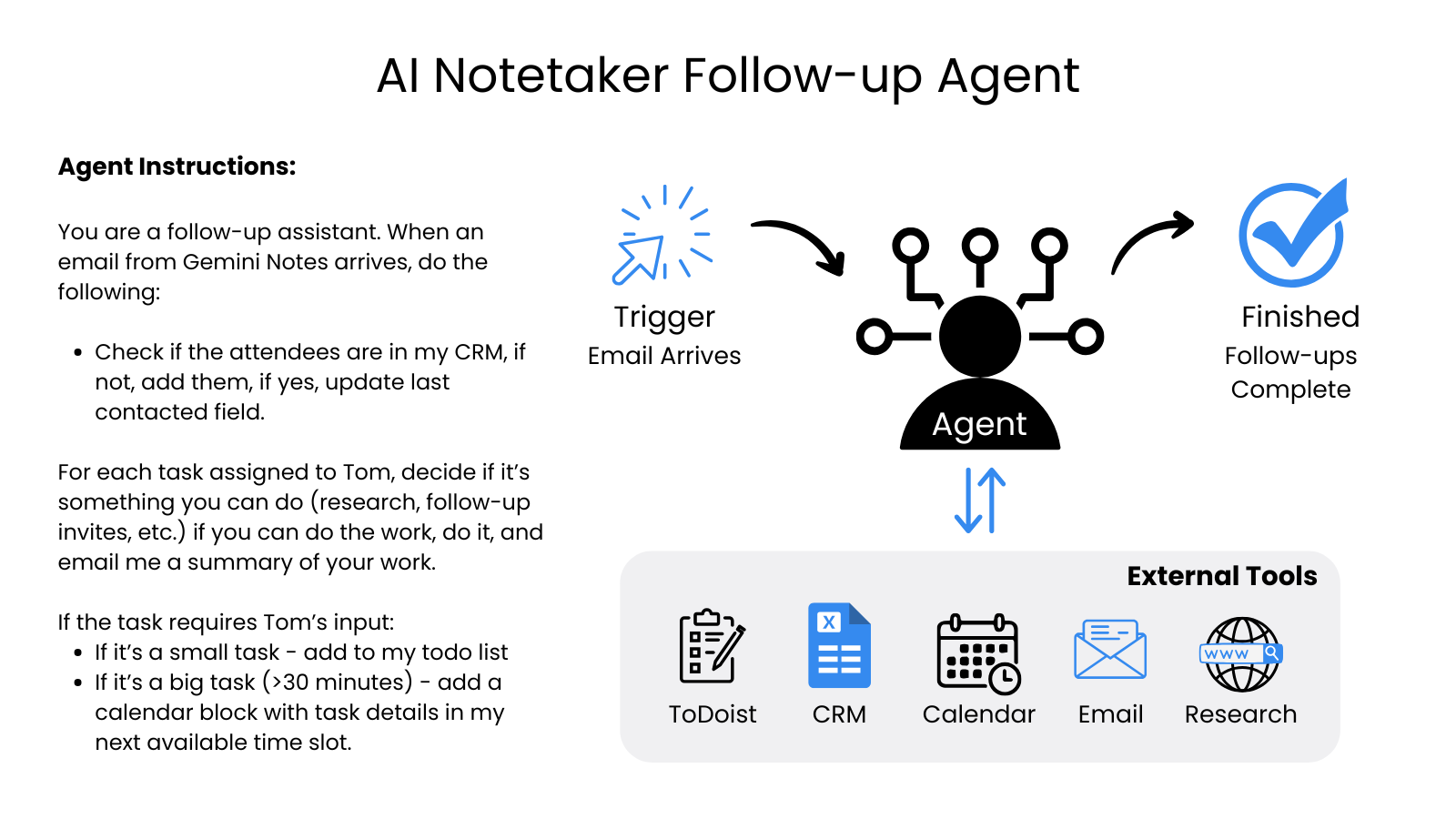
That last one is key. Some of my action items are things the agent could legitimately complete on my behalf. "Look into Obsidian's API" is a 10-minute web search and a one-paragraph summary. The agent could do that while I'm in my next meeting and have the answer waiting for me when I'm out. "Send Grace the meeting notes" is one email to draft. Same.
What you end up with is something that looks less like an automation and more like a digital chief of staff for the post-meeting workflow. It triages every action item from every meeting, does the ones that don't need you, and queues the ones that do — in the right place, with the right context attached.
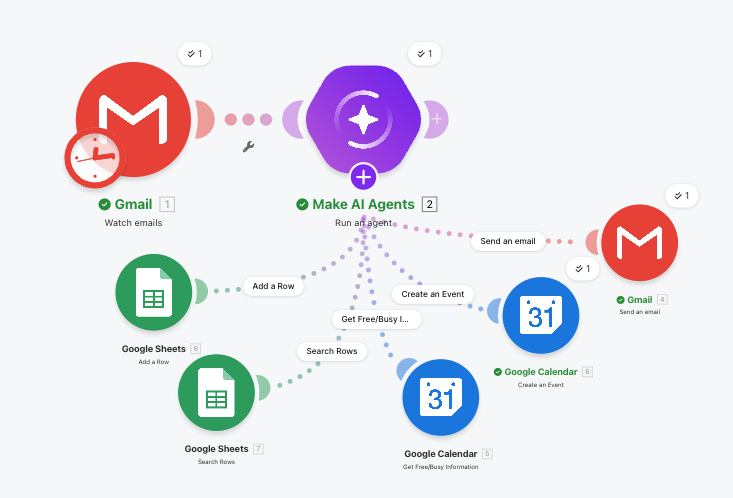
Here's the agent built in Make.com using the native AI Agent module with six attached tools — find CRM by email, add CRM row, update last-contacted, create follow-up event, create calendar block, and send the summary email:
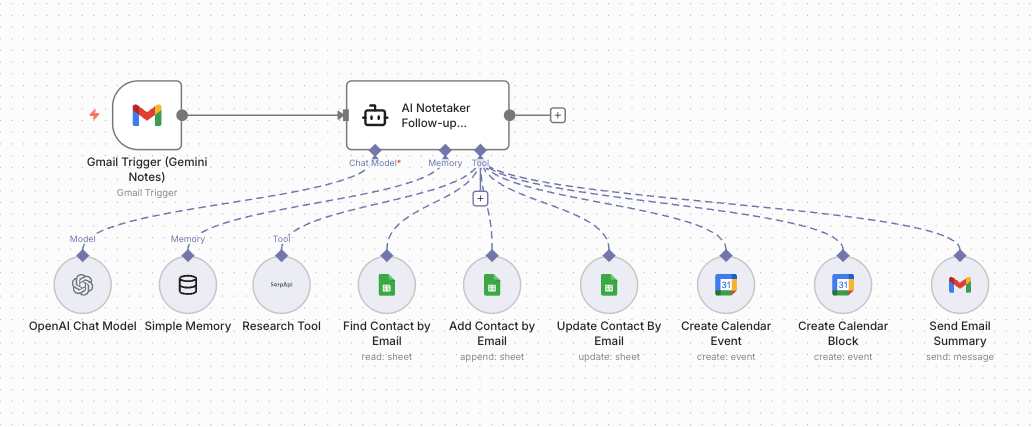
And the same agent in n8n, where the tools fan out as branches off the Agent Module:
This is exactly the kind of capability that fits on the more autonomous end of the agentic spectrum. It's not a single workflow with hardcoded rules — it's a system reasoning about each item and choosing what to do. If you want to go deeper on what makes that kind of agent actually work, I covered the architecture in Anatomy of an AI Agent.
Why this is the moment
Two things make this build accessible right now in a way it wasn't even a year ago.
First, the meeting notes themselves are good enough. Five years ago, AI transcripts were rough — you couldn't reliably automate against them because the input was too noisy. Today's tools produce structured summaries with clearly delineated action items, attendees, and topics. That's a clean enough signal to act on.
Second, the connective tissue is finally cheap. Make.com, n8n, and Zapier can all wire up Gmail → AI → CRM → Calendar → task manager in an afternoon. Throw in Claude Cowork and you can describe what you want in plain English and have it scaffolded for you. Eighteen months ago this would have been a custom integration project. Today it's a Saturday.
A few caveats worth flagging
A couple of things to keep in mind before you point an agent at your meeting notes.
Privacy. Meeting transcripts contain real client information — names, financials, decisions, sometimes things people said off the cuff. Be deliberate about which AI provider sees that data and what their retention policy is. I touched on the broader picture in AI Privacy & Security: What SMBs Need to Know.
Humans in the loop. Anything customer-facing — drafted emails, CRM updates that affect deal status, calendar invites that go to someone else — should land as a draft, not a sent action. The agent does the typing; you press send. This is the same pattern from my agentic email handler.
Meeting tool churn. I'm using Gemini Notetaker today because it fits my Workspace setup, but the space is moving fast. The good news is your automation doesn't really care which note-taker fed it — the input shape is so similar across vendors that swapping the trigger source is usually a five-minute change. Build for the format, not the brand.
The takeaway
Meeting notes used to be about capture — did we get this written down? That problem is solved. The next problem is what happens next — and that's where the next round of productivity gains is hiding.
If you're already getting AI-generated meeting summaries and the action items are sitting in your inbox going nowhere, you're sitting on top of a beautifully structured trigger waiting for an automation. Start with one of the four patterns above. Build it in an afternoon. Then keep going.
If you want help thinking through what that looks like for your team, book a free 30-minute call and we'll map it out together.